FEMA and FCC will conduct a nationwide test of the Emergency Alert System (EAS) and Wireless Emergency Alert (WEA) system. That means today you will receive a WAS test message on your cell phones that are connected to wireless providers participating in WEA. Cell towers will broadcast the WEA test for approximately 30 minutes beginning at 2:18pm EDT (11:18am PDT).
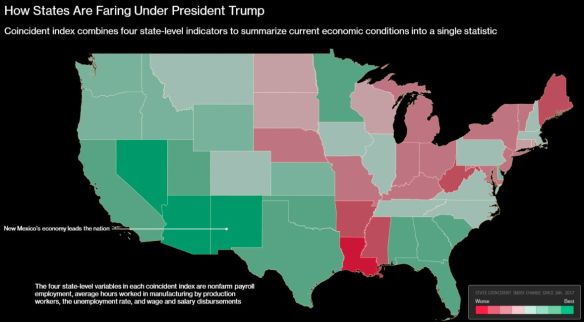
According to an analysis of Federal Reserve Bank of Philadelphia data, the top five states that lead other states in economic gains since President Trump’s inauguration in January 2017 are New Mexico, Nevada, Arizona, California and Georgia. Click the map below to read the short article.
What would be interesting is another map showing what it was before Trump, or a map showing % change.
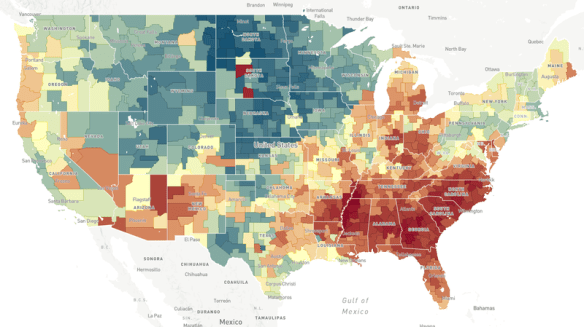
Does the neighborhood you grow up in determine how far you move up the economic ladder? Check out this NPR article and interactive map to explore the Opportunity Atlas.
What is ArcGIS Indoors? ESRI calls it a complete indoor mapping system that will offer a floor aware location platform providing maps, data, and location info for indoor spaces. Scheduled for release in Q4 of 2018, ArcGIS Indoors is targeted for use in facilities, retail and commercial locations, airports, hospitals, event venues and universities, to analyze, locate, navigate, and to collaborate and share indoor information.
To use ArcGIS Indoors for real time indoor positioning and routing directions, the building you are in needs to be equipped with location technology that connects to your phone or tablet where the app is running. The location technology is not part of the ArcGIS Indoors system, but is needed for it to work. ESRI stated that it has used Apple’s location technology for prototype versions of the system.
The ArcGIS Indoors mobile app is an essential part of the system. The app uses a mobile map package that is hosted in ArcGIS Online. The map package contains all the indoor location info relevant to the building, such as CAD/BIM data, points of interest, transportation networks and vector baselines. The logic of the different building floor levels are defined in Excel spreadsheets, as well as points of interest and feature class information.
Right now there is no quick way of generating an indoor location information model. A variety of data sources can be used to create one, but it would probably be best just to start from scratch if no data exists. If you are familiar with the Campus Viewer Tools, you have some knowledge on what needs to be done. ArcGIS Pro will be used to create information models in a two step process. First you create a lattice network that covers all walkable spaces in a building. Second, this serves as the basis for a thin lattice network with more details, using a special set of toolboxes in ArcGIS Pro. Once created, you push the output to ArcGIS Online as a mobile map package to be consumed by the ArcGIS Indoors app.
Watch this video of the ArcGIS Indoors workshop from the last ESRI User Conference. It will give you a great overview on what you need to do with respect to data and getting it all working:
Also click below for more info on ArcGIS Indoors and sign up to stay informed when it’s released.
Register for this webinar today to see how you can use your imagery to gain location insight, use machine learning tools in your applications, and explore advanced object detection from your imagery. The webinar is today from 10-11am.
If your organization is part of the Los Angeles Region Imagery Acquisition Consortium (LAR-IAC), just a reminder there is a LARIAC5 update meeting tomorrow, September 11, 2018 at 9:30am to 12pm. If you plan on attending, make sure to view the meeting webpage and register here: http://go.eagleview.com/lariac-user-group.html .
Also for your reference, here are some important LAR-IAC webpages you should bookmark:
Come join LA County on GIS Day, November 14th, from 9am to 3pm at Los Angeles County Grand Park, Olive Court. Learn how LA County departments, and more than 30 other agencies, academic institutions, and private sector companies use GIS to tackle issues affecting the citizens of LA County.
There will be over 50 booths, GIS-enabled emergency vehicles, a map gallery, speakers, GIS games and prizes, and a dunk tank with LA County Supervisors inside … well maybe not the dunk tank! 😉
Orange County has a new Open Data Portal. You can explore by categories, like boundaries, cadaster, environment, health, infrastructure, etc., or just type a search, like “parcels” or “street centerlines”. There are also links to feature apps and paper maps too. Check it out!
For those of you that use ESRI’s ArcGIS Online product, they just announced that they plan on updating it on September 18. Here are four capabilities you can check out once the update happens: Continue reading →