National Hydrography Dataset (NHD) in ArcGIS Online

How to use the National Hydrography Dataset (NHD) in ArcGIS Online by Al Rea

Have you ever wanted to get a very quick view of what’s in the NHD for an area that you haven’t downloaded?  Even if you have the data on your hard drive, I’ve found the quickest way to see the basic NHD features is through the ArcGIS Online (AGOL) viewer. I’ve made a very simple web map in AGOL that accesses an NHD dynamic map service from The National Map (TNM). To give it a try, open this link: http://bit.ly/1puvHOn

Zoom to your area of interest. You can use the standard map zoom tools, or type in a place name or street address in the search box in the upper right of the window. You need to be zoomed in to a scale where the NHD streams can be displayed reasonably. If you don’t see any streams on the map, click on the “plus” symbol in the upper left corner of the map to zoom in more. Notice that in the legend there is a scrollbar once you’re zoomed in so that streams begin to display. The NHD streams are called “Flowline – Small-Scale” or “Flowline – Large Scale”, and appear at the bottom of the legend. You will need to zoom in so that the scale bar in the lower left corner of the map shows one mile or less to see the ephemeral streams, which are in a dashed brown line style. (Note that ephemeral streams are not shown in all areas.) Intermittent streams are shown in a light blue dashed line style. If you have used this service in the past, you may notice that the symbology has changed recently.

There are several other map services from The National Map that might be of interest to you. A listing can be found here: http://viewer.nationalmap.gov/example/services/serviceList.html. You can bookmark that URL, or just remember this: Search for The National Map, go to the main page, and on the left under Products and Services, click on the Framework Web Feature Services link. You should be able to open the ArcGIS Online map above without having an AGOL login account. If you do have an account, you can save the map as your own and customize it as you like. The TNM services listed above may also be added to your map, along with anything else that is out there on the web.

2014 National Transportation Atlas Database

The 2014 National Transportation Atlas Database, which has GIS data for transportation, was released last week. It is available for free on DVD from the U.S. Department of Transportation.

The DVD is a set of nationwide geographic databases of transportation facilities, transportation networks, and associated infrastructure. These datasets include spatial information for transportation modal networks and intermodal terminals, as well as the related attribute information for these features. Metadata documentation, as prescribed by the Federal Geographic Data Committee, is also provided for each database.

Stanford University to House David Rumsey Map Collection

Stanford University Library has started preparations to receive the David Rumsey Map Collection.  David Rumsey began gathering his map collection over 25 years ago and announced in 2009 that it would be donated to Stanford.  According to Rumsey, technology has risen to the forefront in the University’s plans for the collection and the map center. Computerized tools, such as video and touch-sensitive walls, will be available beside the physical maps. ArcGIS will also be incorporated.

ArcGIS Pro … Very Soon!

After attending the ESRI Conference last week, here is the latest release schedule for ArcGIS Pro:

  • August 2014 – Beta 5 (you can still participate here)
  • September 2014 – 10.3 Pre Release
  • November 2014 – Released as part of 10.3

You can take a look at my last post about ArcGIS Pro.  And here are some extra tidbits of information I picked up at some of the Pro workshops:

  • You will get Pro if you have Desktop
  • Web based install or network install
  • Improved help system, can install local or on server, or not at all
  • Editing is on all the time, no start/stop editing
  • As you work with a layer, the ribbon interface changes for just that layer
  • Bookmarks honor time & space
  • You can export to Excel
  • You can reorder attribute fields
  • True transparency and anti-aliasing when exporting to PDF, smaller file sizes
  • Analysis about 20% faster in Pro
  • Tightly integrated with ArcGIS Online and Server on premise
  • Can use ArcGIS Online as content storage for Pro
  • License levels based on your Desktop license level (Basic, Standard, Advanced)
  • Licenses managed via ArcGIS Online or Portal
  • You grant access to Pro to named users
  • You control product level and extensions for each named user
  • Will show which users are using Pro and how much
  • All popular extensions available in Pro
  • Note: 3D Analyst extension not needed to view 3D data, only for 3D data analysis
  • Python scripts run in Pro with minor changes (no map docs, project files instead)
  • Uses Python 3.4, 64bit
  • You can customize the UI for users
  • You can extend Pro with .NET API, beta this fall and released 2015 Dev Summit
  • Note: No data driven pages in first release of Pro, python script will be provided
  • Note: Cannot create geoprocessing services in the first release of Pro

National Seismic Hazard Maps Updated

Parts of 42 states are at risk of earthquakes during the next 50 years, according to a new report from the U.S. Geological Survey.

The report includes updated maps that show geologists’ predictions of where and how often future earthquakes may occur, and how strongly they may shake the ground.

Many of the at-risk states are in the country’s western half, but the map also highlights hotspots in the Midwest and Southeast. There are 16 states that have regions labeled as being at high risk for seismic activity, because they have histories of earthquakes measuring a magnitude of 6.0 or greater: Alaska, Arkansas, California, Hawaii, Idaho, Illinois, Kentucky, Missouri, Montana, Nevada, Oregon, South Carolina, Tennessee, Utah, Washington and Wyoming.

In making the new maps, geologists considered data from earthquakes that have struck since the maps were last updated, in 2008. For instance, the 5.8 Virginia temblor that struck in 2011 showed that seismic activity can happen in the Northeast. Seismic risk has also increased near Charleston, South Carolina, due to recent earthquakes in the area.

The map gave the Big Apple a slight reprieve. Geologists downgraded the risk that slow-moving waves from an earthquake would hit near New York City. Slow shaking is more likely to damage tall buildings than fast shaking, which is more likely to affect smaller structures.

In California, new information about faults in San Jose, Vallejo and San Diego have raised earthquake risks there. In contrast, the cities of Irvine, Santa Barbara and Oakland have reduced risks, thanks to new insights on the faults in those areas.

The new USGS maps are part of the National Earthquake Hazards Reduction Program, a partnership of four federal agencies created by Congress to reduce the risks to life and property caused by earthquakes. In addition to the USGS, the other agencies include the Federal Emergency Management Agency, the National Institute of Standards and Technology and the National Science Foundation.

2014 ESRI Conference First Day

For those of you that could not make the conference this year, here are some highlights that I took away from the first day:

  • ESRI continues to focus their products to the web and integrate with with the web.  “Web GIS” and “ArcGIS as a Web Platform” are the themes.  They want to extend the ArcGIS Data Model into the cloud.  You will see this more in version 10.3 in 2015.
  • ESRI is also pushing GeoDesign.  They stress that it is not just something planners do, it is what all of us GIS types do on a daily basis.  ESRI is creating tools for GeoDesign use.
  • As suspected, ArcGIS Pro is the product to show off this year.  I like the fact you can have multiple layouts and view your 2D and 3D windows together.  I also liked the demo showing how they changed the annotation rendering and symbology on the fly using the tools in the ribbon interface.
  • There is a new web app builder for Javascript using HTML5, for both ArcGIS Server and ArcGIS Online.  It has some 30+ widgets to work with, you can change things like the layout, color, logo, title, and other settings.  Developers will have tools to extend it as well.
  • Explorer for ArcGIS is now supported on the Mac as well as iPhone and iPad.
  • ArcGIS Online comes with better administration tools.  You can create custom user roles so you can specify what exactly each user can do.  Better metrics and reports down to the user level if you want.  There are new analytic tools, like a drivetime tool, ready to use maps from the Living Atlas, and an Enrichment Layer tool for you to add extra fields of data to your existing layers (think joining tables together).
  • Also your web maps can be extended into a presentation using the Presentation Builder (think Briefing Book).
  • There was a cool demo of a Hotspot Analysis Tool using time as the third dimension.  It aggregates data into a space/time cube which allows you to view statistically significant clustering of your hotspots.
  • 3D is also the big thing.  There are new tools to create web scenes and to fuse your existing data into the 3D environment.  You can quickly build a 3D scene of buildings and trees.  You can create slides for presentations and also save your work online to be able to view your 3D data on a web browser, tablet, or mobile device.  You will see new functionality in 10.3.
  • ArcMap 10.3 is focused on advanced science capabilities.  Will support space/time formats, python aggregator function, raster process template, vector field symbology, and infographics tool.
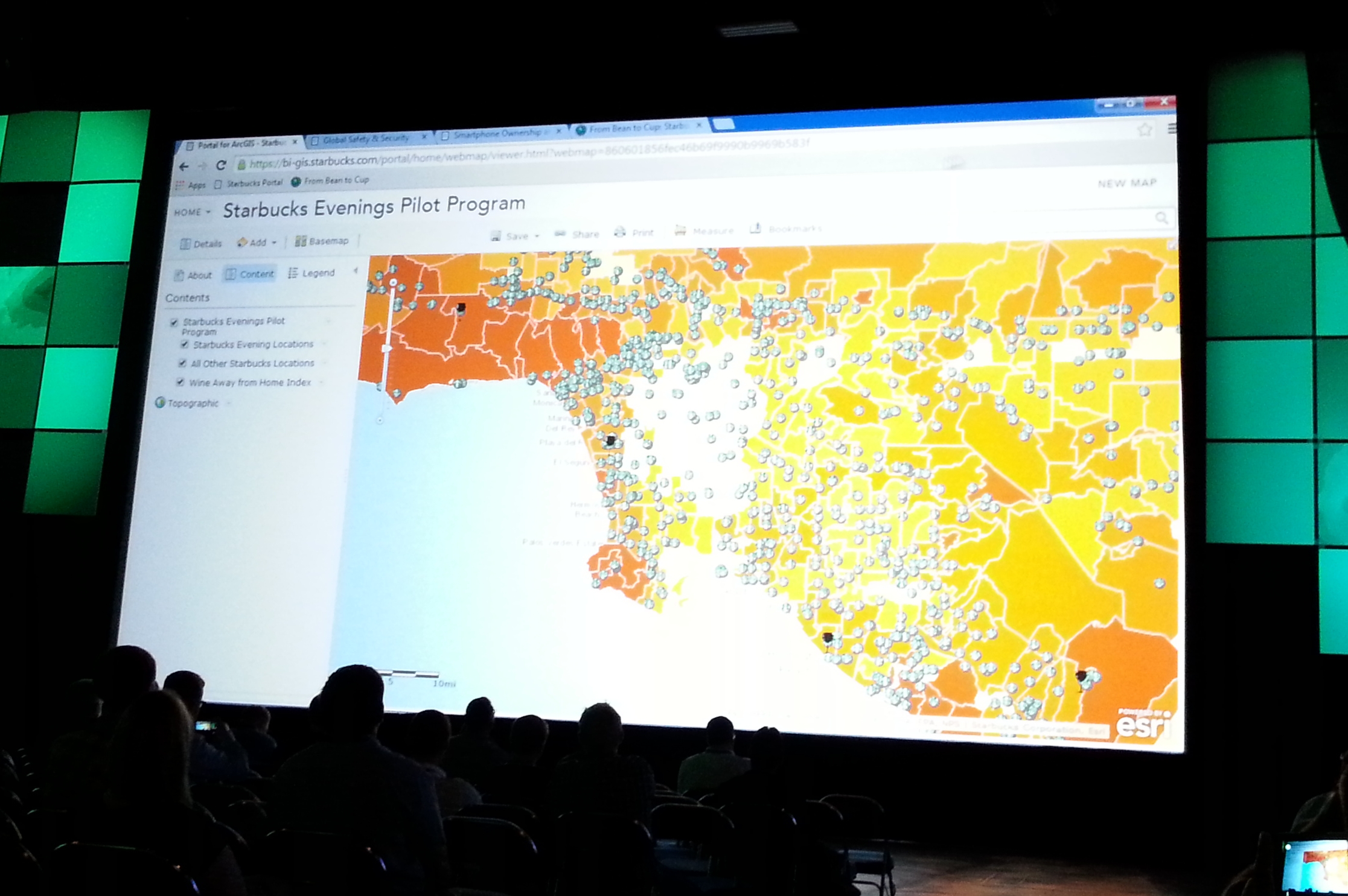
  • Starbucks did a presentation on how they use ESRI poducts to locate new stores.  My takeaway from their presentation … they will be starting a “Starbucks Evenings Pilot Program” where certain locations will be serving beer and wine!  The map of the LA area below shows those locations (dark symbol) with all other stores (green symbol) and a wine away from home index layer (white-yellow-orange polygons).

starbucks

So there you go.  And also, I bet if you wait a day, ESRI will put their first day presentations online at video.esri.com.  Check it out! -mike

Twelve Things Worth Knowing from ESRI 2014 User Conference Q&A

Found this article interesting reviewing the Q&A for this years ESRI Conference:

http://apb.directionsmag.com/entry/twelve-things-worth-knowing-from-esri-2014-user-conference-qa/407604

You can see how ESRI is really pushing the cloud option.  Also ArcGIS Pro will be tightly linked to ArcGIS Online or Portal.

Hope to see some of you there at the conference next week! -mike

Southern California GIS Community Meeting at ESRI Conference

Southern California GIS Community Meeting
ESRI Conference in San Diego next week
Tuesday, July 15, 2014, 12pm to 1pm
Room 25C, San Diego Convention Center

This meeting is an opportunity for the GIS community in Southern California to meet and socialize. If you are a GIS professional, student, instructor, or interested person, you are invited to get together and meet each other. The event is open to everyone, and is supported by SoCalGIS.org, Geospatial LA, the LA Regional GIS Forum, and LA County Enterprise GIS. So go ahead and grab your lunch and bring to the 2nd annual meeting of the Southern California GIS Community!