Interesting infographics and maps about roadway fatalities by substance type. Data includes drug and alcohol related roadway deaths from 1995 to 2013. Looks like LA County drivers like stimulants.



Interesting infographics and maps about roadway fatalities by substance type. Data includes drug and alcohol related roadway deaths from 1995 to 2013. Looks like LA County drivers like stimulants.
World Imagery Firefly was created for thematic maps. Currently in beta, Firefly is an alternative view of the default World Imagery basemap, and is designed with desaturated colors. When zoomed out, the map appears grayscale, but as you zoom in, the colors become more saturated until the full color detail of the imagery appears. World Imagery Firefly is especially useful for overlays of brightly styled layers when you want an imagery basemap, but do not want the imagery to compete with the layer styling. Check it out.

URISA is conducting their annual GIS Salary Survey. An executive summary will be provided for free after the survey. A comprehensive analysis of the results will be available for purchase. For more info and to participate, click here.

Monday was the opening day to the 2017 ESRI User Conference in San Diego. The Plenary session was full of info as usual. It was all about Web GIS, Exploratory Data Analysis (Insights for ArcGIS), ArcGIS Pro, and ArcGIS Server. Some highlights from my notes:
I’m sure the whole Plenary session from today will be viewable soon on ESRI’s video webite.
Looking forward to the 2017 ESRI User Conference on Monday? To help you prepare and make the most out of your UC experience, ESRI has created industry fliers for you to learn more about the industry events happening this year at UC. Use them to fill out your calendar for next week!

If you like to make stuff, maybe making a laser cut Dymaxion Globe is something you would like to do? Click below to read the article and download the needed files for your laser cutter … you have one right?

Starting in July, governments around the country will start the process of ensuring the accuracy of their address lists through the 2020 Census Local Update of Census Addresses operation. LUCA is a voluntary, once-a-decade opportunity for governments to add, correct or delete addresses on the lists and maps used to conduct the decennial census. An accurate and complete census helps governments plan for future infrastructure, program and service needs.
On July 14, the U.S. Census Bureau will begin mailing invitation letters and registration forms to approximately 39,000 tribal, state and local governments across the nation to encourage them to participate in LUCA. This operation is the only opportunity governments have to review and improve the Census Bureau’s residential address list before the 2020 Census.
The Census Bureau relies on a complete and accurate address list to reach every living quarter and associated population for inclusion in the 2020 Census. Participation in LUCA helps ensure an accurate decennial census count in communities across the nation.
LUCA Participation
All LUCA participants receive:
Promotional workshops are underway, and starting in October, training workshops will offer “hands-on” experience using the LUCA materials. Self-training aids and webinars will also be available through the LUCA website. Beginning in February 2018, registered participants will receive materials to review the Census Bureau’s address list for their jurisdiction, and they will have 120 days to return their updates to the Census Bureau.
Other LUCA milestones and information can be found in the 2020 Census detailed LUCA Information Guide.
Road to the 2020 Census
The goal of the 2020 Census is to count everyone once, only once, and in the right place. The Census Bureau is using expert resources and experience in and out of the government to make the 2020 Census a success. As census operations and testing move forward, the Census Bureau will continue to improve its innovations using mobile and geospatial technology, administrative records and self-response via the internet.
Daniel Velez
Public Information Office
301-763-3030 / pio@census.gov
census.gov
Hello everyone,
I wanted to let you know that I released a new course on Udemy called “Display and Analyze your GIS data on the web with Leaflet.js”
This course has almost 13 hours of content on programming client-side applications with Leaflet and Turf.js. I believe it is by far the most comprehensive educational material available on Leaflet.js web mapping.
Other than the cost of the course (Now 50% off, $50 total) there are no costs using this method. It uses all open source material. Learn more or sign up at
https://www.udemy.com/display-and-analyze-gis-data-on-the-web/?couponCode=MAILING
Thanks,
Mike Miller
http://www.millermountain.com/
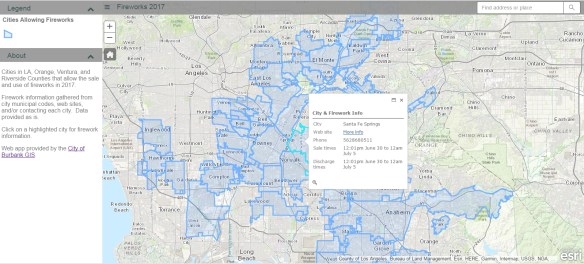
July 4th will be here soon and that means Fireworks! The fireworks app I have used for the past few years has been updated. It includes the cities in LA, Orange, Ventura, and Riverside County. If you love fireworks and want to find out where you can legally buy and shoot them off in SoCal, check out the app!
If your organization participates in LARIAC, then you probably know that right now you have Early Access to the 2017 imagery (both orthos and obliques) in Pictometry’s online CONNECTExplorer application. Keep in mind the Early Access imagery still has work to be done on it, but at least you can take a look at the new stuff while they are working on it.
One thing you can do is bring some of the ortho imagery into your ArcGIS Desktop environment. Here are the simple steps to do so:
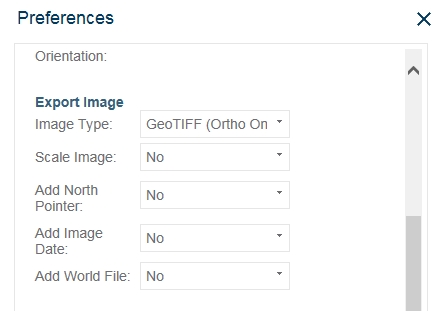


The GeoTIFF images are actually using geographic coordinates (WGS84), but they reproject very well into State Plane.
This is a very quick way to bring in the new 2017 Early Access imagery into your maps if you need to. As the imagery is cleaned up and worked on to create preliminary images, there will be map services setup for you to consume in your applications. But for now, you can use these steps. Enjoy! -mike
 SoCalGIS.org