Unknown's avatar

About socalgovgis - Michael Carson

Michael Carson, GIS Manager (retired) for the City of Burbank and President of Southern California Government GIS User Group. Currently teaching GIS at College of the Canyons in Santa Clarita.

Switching to ArcGIS Pro from ArcMap

ESRI Press recently released a new book titled “Switching to ArcGIS Pro from ArcMap”.  I decided to check it out and let you all know about it.

switchingtoprol

The book is in 8×10 size format and is rather skinny, only 3/8 inches thick.  Some of you might call this a pamphlet, not a book.  There are 172 pages in color.  ESRI will charge you $50 if you buy it from themAmazon about $31 for the book and $28 for Kindle version.

The author of the book is Maribeth Price, Professor of Geology and Dean of Graduate Education for the South Dakota School of Mines and Technology.  She teaches college GIS courses and has written textbooks using ESRI software.

If you need to learn GIS, this is not the book for you.  The book was written for seasoned ArcMap users who understand the GIS terminology, data structures, and procedures when using ArcGIS software.  The book focuses on how ArcGIS Pro is different from ArcMap and quickly tries to enable someone to make the transition to Pro.  The book leverages a user’s ArcMap knowledge to help them learn ArcGIS Pro quickly and efficiently.

The book assumes the user has a license for ArcGIS Pro, though it does come with an eval code on the inside back cover for a 180-day trial license which you can get through the book’s resource page.  An organizational account for ArcGIS Online is recommended, however the first few exercises can be used with an ArcGIS Online public account.  Data comes with the book for the exercises and can be downloaded from the book’s resource page.

The book is organized into 11 chapters, which you can look at here.  As you can see, the book takes you through the GUI, working with a project, 2D and 3D navigation, symbolizing features, labeling, geoprocessing, joining and relating tables, creating layouts, managing data, and editing data … all the basics to get you up to speed using Pro.  The exercises in each chapter help users become accustomed to the new interface and get hands-on experience using the tools and workflows in Pro.  You can take a look at a sample chapter here.

The book is good for someone like me who has been using ArcMap since version 8!  I hate the ribbon interface that Pro uses, just like other Microsoft Windows products like Word and Excel, I find it very hard to find what I am looking for.  However, I understand why ESRI went this way, trying to keep the user experience the same with a similar GUI.  The GUI is highly context sensitive, meaning that it changes on the basis of what you are currently doing, thus making the relevant tools more accessible, but again can be very confusing because commands and tools do not stay put … but I digress.

Each chapter has opening text that explains the concepts and tasks you are about to do in the exercises.  Then in the “Time to explore” section, the exercises, or “objectives”, are easy to follow with step by step instructions.

I like the format of the book.  I find the portions of the interface you are exposed to rather limited and basic, but that is what this book is about, to get the ArcMap user up to speed with common GIS and mapping tasks in Pro.  A deeper dive you can do with the ArcGIS Pro Help or even try out some other books like Getting to Know ArcGIS Pro or even going through a single project from start to finish in Understanding GIS An ArcGIS Pro Project Workbook.

The book does tackle the question “When should I switch?”.  Some examples of delaying switching over to Pro include:

  • The organization does not have enough computers capable of running Pro
  • Some critical functionality may not yet be available in Pro
  • Your organization has custom scripts or tools that must be updated to run in Pro
  • Third party extensions might not run in Pro
  • Pro does not recognize personal geodatabases and ArcInfo coverages
  • The Excel interpreter is different and seems less forgiving than the one in ArcMap
  • The annotation editing tools in Pro are still catching up to ArcMap

But do not wait too long, for ArcMap’s days are numbered.

If you are looking for a basic good book to help you with migrating from ArcMap to Pro, this is worth getting a copy.  -mike
Robocalls

Mad about robocalls?  It seems to be increasing on my cell phone every year.  In 2018, a record 48 billion robocalls were placed to phones in the US.  That works out to 1,500 robocalls per second!  Check out this map on robocalls and read the Consumer Reports article about it and how you can start the wave to stop it.

robocalls


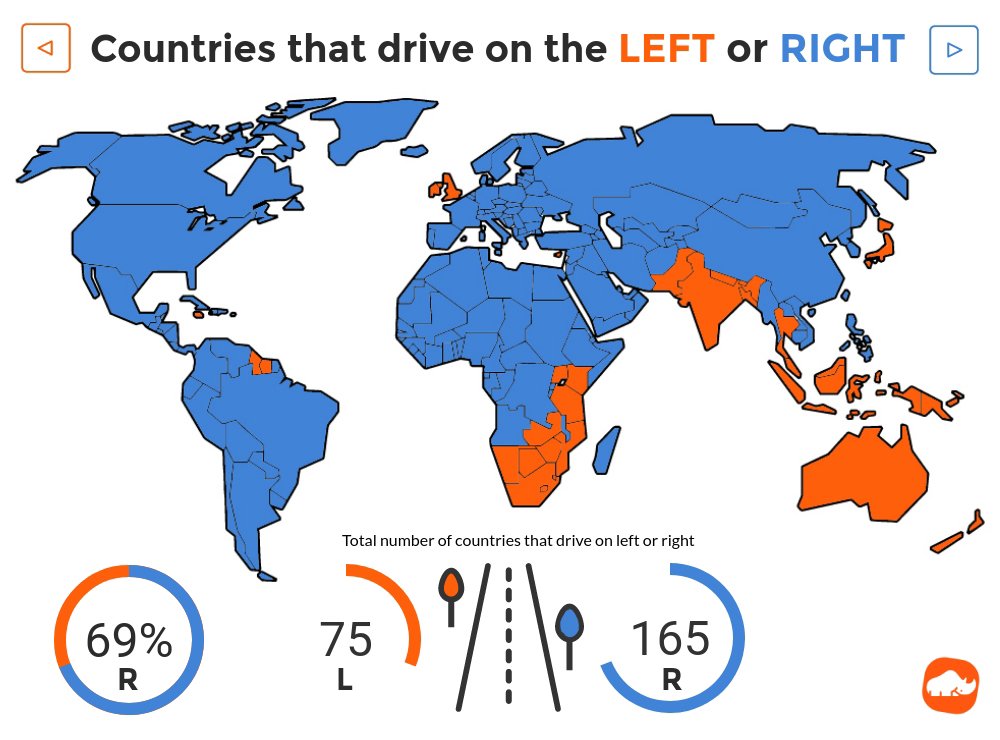
Left and Right Hand Side Driving

Most countries drive on the right hand side of the road.  Why do some countries drive on the left hand side?  The historical account is that most countries which were British colonies kept to the left hand side of the road.  British horseback riders used to ride on the left hand side, thus keeping their right arm free to offer greetings or draw their sword.  Similarly, the USA teamsters used to sit on the left hand horse while driving a wagon and therefore kept their right hand free for whipping the other horses, however, later they decided to start driving on the right so that they could see the passing wheels of other wagons and avoid collisions.

Another fun fact, Sweden changed from the left to right hand side in 1967.

Instructional Story Maps

Maps can be beautiful, engaging, and informative ways to learn or educate about a topic, and story maps offer a way to add multimedia and narrative to the mix as well.  But for the uninitiated, the prospect of creating a high-quality digital map may be daunting.  Fortunately, ESRI has created a free resource to help … Instructional Story Maps.  Here you will find approximately 20 story maps, each focused on a different cartographic concept or technique.  Examples include tutorials on creating visuals such as glowing borders or sunrise effects, an explainer on making heat maps to communicate density, as well as a series of tutorials featuring ESRI’s Cascade story map template and a series focused on the platform’s smart mapping features.  Check it out!

instructionalstorymaps

ArcGIS 10.7 Now Available

ESRI has announced that ArcGIS 10.7 is now available for download.  For those of you with current maintenance, you can download it from my.esri.com.  See the What’s New for Desktop and Enterprise.

Some notes about installing ArcGIS 10.7:

The ArcGIS 10.7 setup packages are designed to detect and upgrade an existing installation of the same ArcGIS product. The settings for the installation location and authorization information are retained during the upgrade. See the installation guide for more information on installation upgrades and new installations.

ArcGIS 10.7 Single Use Licenses:

If ArcGIS 10.7 will be installed on a machine that is different from where a previous ArcGIS 10.x product is currently installed and you wish to use the existing ArcGIS 10.1—10.6.1 authorization number for ArcGIS 10.7, the earlier version of an ArcGIS 10.x product must first be deauthorized before authorizing ArcGIS 10.7.

ArcGIS 10.7 Concurrent Use Licenses:

  • The copy protection mechanism for ArcGIS Desktop 10.7 and ArcGIS Engine 10.7 Concurrent Use requires that ArcGIS License Manager 2018.1 be installed to support these products.
  • Existing ArcGIS 10.1—10.6.1 authorization numbers will work with ArcGIS Desktop and Engine 10.7.
  • Existing ArcGIS Enterprise 10.6—10.6.1 authorization numbers will not work with ArcGIS Enterprise 10.7. You must obtain a 10.7 authorization number.


ESRI Acquires indoo.rs GmbH

ESRI has announced the acquisition of indoo.rs GmbH, a provider of Indoor Positioning System (IPS) technology.  The indoo.rs software will become part of ESRI’s ArcGIS Indoors, a mapping product that enables interactive indoor mapping of corporate facilities, retail and commercial locations, airports, hospitals, event venues, universities, and more.  The acquisition will also provide users of ESRI’s ArcGIS platform with imbedded IPS location services to support indoor mapping and analysis.  The indoo.rs headquarters will also serve as an ESRI R&D centre based in Vienna, Austria, focused on cutting-edge IPS capability.

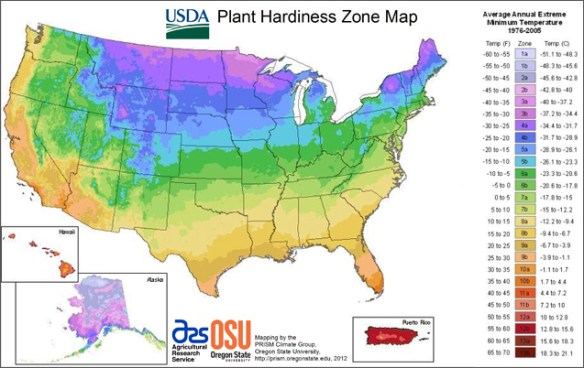
Plant Hardiness Zone Map

Some of you might be familiar with USDA’s Plant Hardiness Zone Map.  It is the standard by which gardeners and growers can determine which plants are most likely to thrive at a location.  The map is based on the average annual minimum winter temperature, divided into 10-degree zones.  Besides the static map, there is also an interactive GIS map.  You can also enter a zip code and find your hardiness zone.  Check it out!

homepage_map