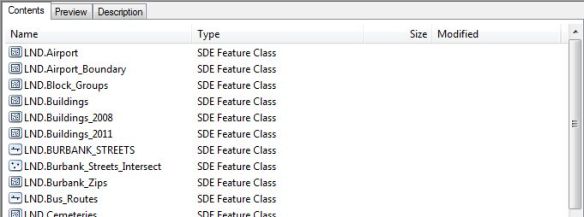
Have you ever tried using ArcCatalog to look at a listing of your feature classes in an SDE Geodatabase to see when they were modified, only to be disappointed that no dates are displayed? I was:
If you’ve been around a while, remember that 1984 Wendy’s commercial with the old lady that kept saying “Where’s the beef?”:

Yeah ESRI, where’s the beef? You do this for a File Geodatabase:
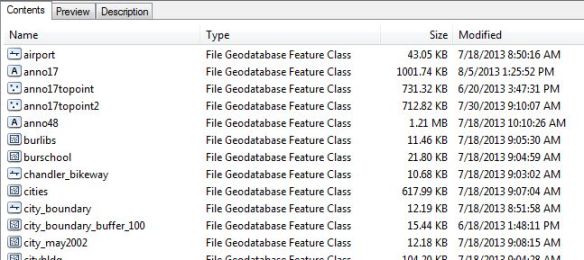
Why not for SDE? Sure, I can use versioning and look for the date that way, but we are a small GIS shop here and only a few people do the editing anyway. What to do?
After talking with our friendly Oracle DBA, searching through some system tables, searching the ArcPy classes, and working on a SQL query, I finally came up with a nice Python script that will pull out the SDE Geodatabase feature classes (they are just tables) and list the creation and modification dates. The info is also saved to a CSV file so you can open it up in Excel.
Here is the script, free for you to use. ** See update 12/4/2017 in comments section **
# ---------------------------------------------------------------------
# get_sde_date.py
# Created on: 3/26/2014
# By: Michael A. Carson, GIS Manager, City of Burbank GIS
# Description: Queries SDE GDB in Oracle to get feature class table dates.
# ---------------------------------------------------------------------

# Import modules
import arcpy,sys,csv

# Python environment
arcpy.env.overwriteOutput = True

# Local variables
sde_conn_file = r"H:\testdir\sde_gdb_connection.sde"
output_file = r"H:\testdir\sde_fc_tables.csv"
sql_statement = "select OWNER,OBJECT_TYPE,OBJECT_NAME,CREATED, \
    LAST_DDL_TIME from DBA_OBJECTS where OWNER = 'GDB' \
    and OBJECT_TYPE = 'TABLE'"

# Execute SQL statement and save table list
try:
    # Make data path relative
    arcpy.env.workspace = sys.path[0]

    # Use valid SDE connection file to connect to SDE GDB in Oracle
    sde_conn = arcpy.ArcSDESQLExecute(sde_conn_file)

    print("=============================================\n")

    print("Execute SQL Statement: {0}".format(sql_statement))
    try:
        # Pass the SQL statement to the database
        sde_return = sde_conn.execute(sql_statement)
    except Exception as err:
        print(err)
        sde_return = False

    # If the return value is a list, display each list as a row
    if isinstance(sde_return, list):
        for row in sde_return:
            print(row)
        f = open(output_file, 'wb')
        writer = csv.writer(f, delimiter=',')
        writer.writerow(['OWNER', 'TYPE', 'NAME', 'CREATED', 'MODIFIED'])
        writer.writerows(sde_return)
        f.close()
        print("Number of rows returned by query: {0} rows".format(len(sde_return)))
        print("=============================================\n")
    else:
        # If the return value was not a list, the statement was most likely a DDL statement
        if sde_return == True:
            print("SQL statement: {0} ran successfully.".format(sql_statement))
        else:
            print("SQL statement: {0} FAILED.".format(sql_statement))
        print("=============================================\n")

except Exception as err:
    print(err)
Keep in mind this is for an Oracle SDE Geodatabase. I am also using ArcGIS 10.1. It will probably NOT work for SQL Server or PostgreSQL. Post a comment if you get it to work on those databases.
So how does this work? Looking at the local variables section, you need to change the value for the sde_conn_file and sql_statement. You can also change the output_file name if you want too.
# Local variables
sde_conn_file = r"H:\testdir\sde_gdb_connection.sde"
output_file = r"H:\testdir\sde_fc_tables.csv"
sql_statement = "select OWNER,OBJECT_TYPE,OBJECT_NAME,CREATED, \
    LAST_DDL_TIME from DBA_OBJECTS where OWNER = 'GDB' \
    and OBJECT_TYPE = 'TABLE'"
The script uses your SDE connection file to connect to the SDE Geodatabase … AS SDE. This is important. You must connect as the SDE user since the SDE user has privilages to read some of the Oracle system tables that store the info we want to extract. So where can you find your connection file? You probably used ArcCatalog to make your connection to the SDE Geodatabase. Here are some of mine:

They are listed under Database Connections in the ArcCatalog Tree. These connection files are located under your user directory (I’m assuming you are using Windows 7). I found mine located under here:
C:\Users\mike\AppData\Roaming\ESRI\Desktop10.1\ArcCatalog\
The connection files are named the same as you see them in ArcCatalog. I just copied the one that connects as the SDE user and copied it to my workspace for the script. If you don’t want to copy the file, just set the sde_conn_file variable to point to wherever it is. The nice part about using a connection file is that you don’t expose your SDE user password in the Python script.
Now the SQL statement:
sql_statement = "select OWNER,OBJECT_TYPE,OBJECT_NAME,CREATED, \
    LAST_DDL_TIME from DBA_OBJECTS where OWNER = 'GDB' \
    and OBJECT_TYPE = 'TABLE'"
Note the “\” is just a Python line continuation character that I used to make this fit in this blog (and still run in Python as you see it). Normally I would have the whole thing on one line! Anyway, here is where you want to modify the owner. I have an owner, the database user named GDB, that I use to create and modify some of our feature classes in the SDE Geodatabase. I want to pull out just those tables that are associated with user GDB. If you have more users that edit data, you can change the owner part of the SQL statement this way:
(OWNER = 'USER1' or OWNER = 'USER2' or OWNER = 'USER3')
Everything else should stay the same.
Now run your Python script. It should connect to your SDE Geodatabase using the ArcPy class ArcSDESQLExecute and your connection file, then execute the SQL statement, return a list of records with the owner name, object type, creation date, and date last modified, then write the list to the output CSV file. Here is the output when I ran my script:

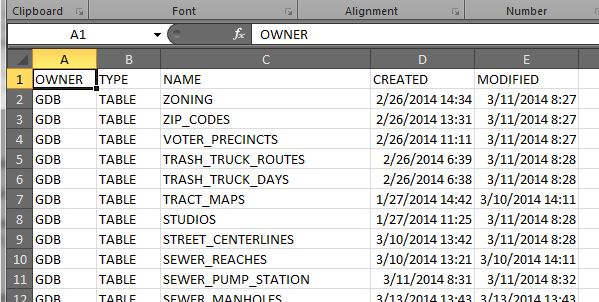
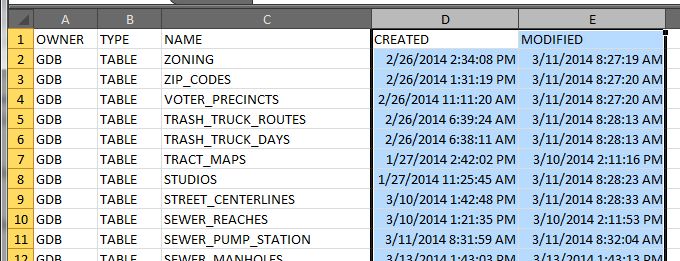
And here is my CSV file:

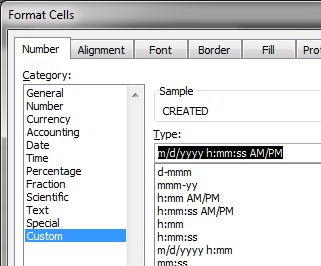
The one thing I don’t like is the default date/time format Excel sets for the CREATED and MODIFIED column. To change it, I select both columns, right click to select Format Cells, then use a custom date/time setting like so:

You can pick from a list or enter what you want like I did. Much better!

Remember, everything that is listed is a table. Your feature classes are just tables as well. You might notice in your output that there are tables listed that are not feature classes, like indexes (_IDX$) and location tables for geocoding (_LOX). You could filter those out in your SQL statement. For me, I like to see everything.
You could also modify this script and run it as a scheduled task for a monthly report, thus helping you identify a volume of modifications to your data over time. Of course your friendly DBA could probably do that from the database side of things, but then you would not have fun doing this by yourself!
Please, if you modify the script to work with SQL Server or PostgreSQL, tell us how by posting a reply. Did I mention that before?
So there you have it, the ability to get at the modification date for feature classes in an Oracle SDE Geodatabase. Maybe ESRI will change it so we can see it in ArcCatalog in the next version? Time will tell. Enjoy. -mike






 SoCalGIS.org