Gotta love those robotic birds. The FAA predicted in 2012 that within 20 years time there could be as many as 30,000 drones flying over the US soil alone. Are you prepared to identify them? Get your survival guide today!


Gotta love those robotic birds. The FAA predicted in 2012 that within 20 years time there could be as many as 30,000 drones flying over the US soil alone. Are you prepared to identify them? Get your survival guide today!
There is a free workshop for GIS Managers on February 10, 2014 hosted by the City of Pasadena. Registration is limited to public sector government agencies. The workshop is ideal for:
Topics covered include:
Take a look at the flyer and sign up! You can also register here.
Interesting article about thieves that steal rare books and maps from libraries, like this guy:
William Jacques, an oil-company accountant dubbed the “Tome Raider” by the British press, was jailed for stealing rare books by Newton, Thomas Paine and others from Cambridge University and other libraries in the 1990s. When he was released, he promptly stole books from the Royal Horticultural Society. Many books remain missing, and he is now banned from all U.K. libraries.
Read more here.
Over 30 years ago, a man worked on this maze for over 7 years and no one knew about it until now. It is probably unsolvable. Check it out.

Apparently you can purchase a copy, though it is in high demand and on backorder: http://shop.spoon-tamago.com/collections/new/products/papas-maze
A new smartphone app called EnLighten is telling drivers how long they might be waiting at traffic lights. Inventor Matt Ginsberg’s novel creation predicts when a red light will turn green.

January 17 will be the 20th anniversary of the Northridge earthquake in 1994 that killed more than 60 people, collapsed freeways and apartments, and remade the streetscape in several parts of town (and on the campus at UCLA.) Click the map for more info on the LA Observed blog.

Thanks goes to Kayla Folkins from the City of Pasadena for finding this one.
Demographic data down to the block level on DVD … and it’s free!
Availability: Summary File 1 is available as a two DVD set. The DVDs contain the 2010 Census Data Engine retrieval software allowing users to manipulate, display, and download data from the file.
Discs:
For more information and to order the free DVD set, visit this US Census page.
In my organization we use ArcGIS Server to serve up map services for our GIS users and other business applications. This year we are looking at re-organizing some of our map services. One of the tasks we have is to rename some of them. Have you ever tried to do that? I thought I would just use ArcCatalog to stop the map service, right click on the name, select rename and change it … but no, you cannot do that. So I tried using ArcGIS Server Manager, but nothing. Do I really have to delete it and recreate it again with the new name?
I did find this suggestion in one of the ESRI forums, but it is not for the faint of heart:
It is possible to change the name of a map service by renaming the config file (cfg) and changing the references inside the cfg file to match the new name. The cache folder will also need to be renamed to match the map service name. You will also need to restart your SOM Service and it’s probably a good idea to remove the existing map service from any existing web applications. A better way to handle this would be to rename the cache folder and publish a new map service to match the renamed cache folder. This will ensure that the map service is created correctly by ArcGIS Server.
What? I just want to rename the map service! Well, have no fear, the ArcGIS Server Administrator Directory is here! I’m using ArcGIS Server 10.1, so to get to it I entered the following in a web browser:
http://your-server-name:6080/arcgis/admin
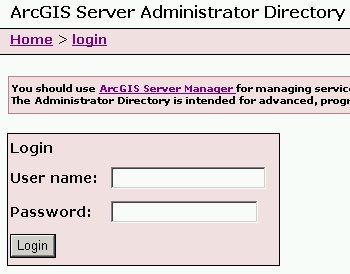
You are presented with a message about using ArcGIS Server Manager instead for managing services and how the Administrator Directory is intended for advanced programmatic access to the server. Ignore all of that and login using your ArcGIS Server admin user name and password. Once logged in, you are presented with a list of Resources and Operations.
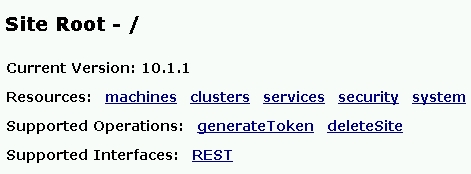
Click on the services Resource. You are then presented with the root folder of your map services directory. Click through until you see the map service you want to change. For this exercise I created a map service named “test_image” that I will rename.
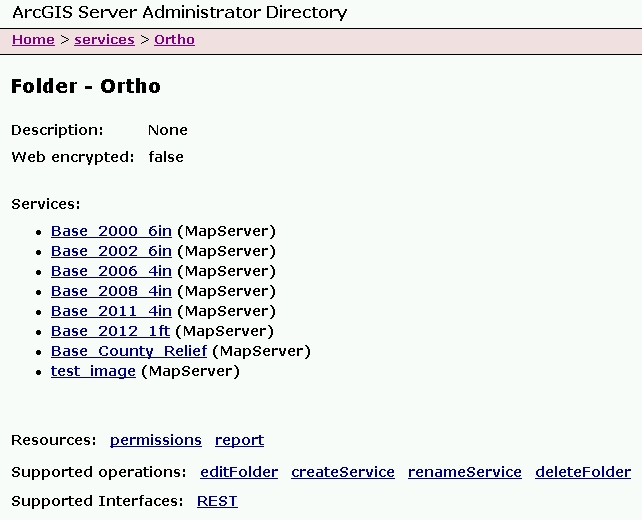
At the bottom of the listing in Supported Operations, click on renameService.
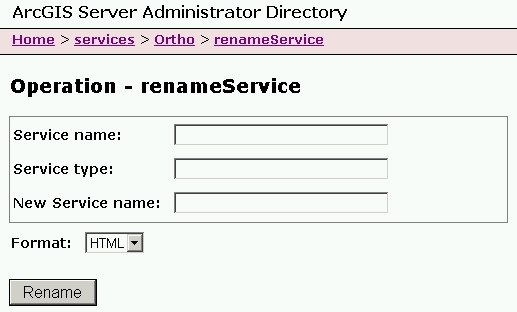
Enter your map service name, service type, and new service name.

Note since this is a map service, the Service Type is MapServer. My new map service name will be “test_image2”. Click on the Rename button and wait a little. Once done, you will see the new listing with the name changed.
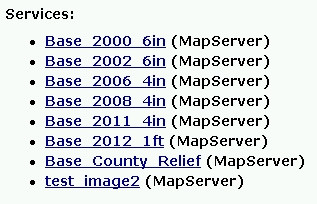
That’s all there is to it. Do keep in mind if you change the name and your GIS users connected to the old name, they will need to re-add the service to their map or applications.
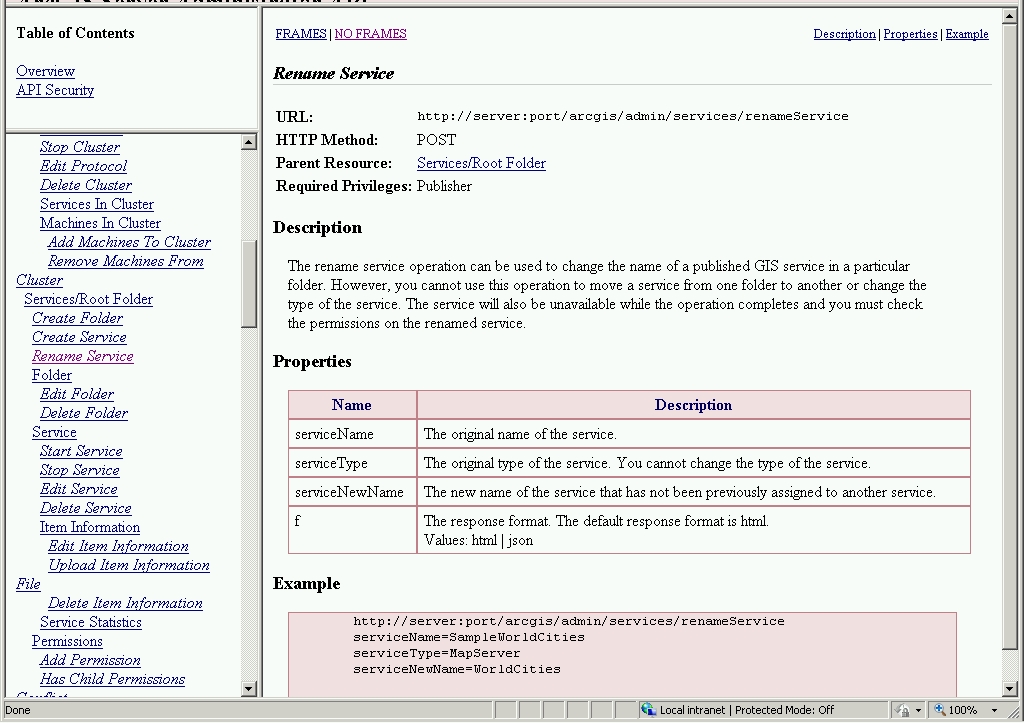
While you’re still in the ArcGIS Server Administrator Directory, click on the API Reference link in the upper right of the page. You can take a look at the renameService reference by scrolling down to Cluster > Rename Service
That is all for now. I hope this makes renaming map services a little less painful for you. If you know of a better way, please post a comment to share.
-mike
Here’s another one I found for your SoCalGIS info fix … and yes I am catching up from vacation! 🙂 -mike
In 1973, the United States Army produced training film TF5-4523 entitled, “The Mapmaking Process” which it described as explaining the “theory of mapmaking, and illustrates the methods and techniques used to produce maps; planning, surveying, compiling, and reproduction.” Retrieved from the National Archives, the training video is available in three parts for viewing.
Read more and watch the video posted on GIS Lounge:

ESRI has released a new version of ArcGIS API for JavaScript. Some new features include:
Check out the ESRI blog posting for more info.
 SoCalGIS.org