New 1:24000 scale California topographic maps are now available for download. These maps include several new datasets and data updates. Click below for more information.


New 1:24000 scale California topographic maps are now available for download. These maps include several new datasets and data updates. Click below for more information.
For those of you viewing the 4-band NAIP image services in ArcGIS Desktop, you can put the 4th band to work and view the imagery as Color Infrared (CIR).
First to get the 4-band NAIP image service into ArcGIS Desktop (I’m using 10.2.2), click on the Add Data button and select “GIS Servers” from the “Look in” pulldown menu. Then double click on “Add ArcGIS Server” in the list.

You will be asked what you would like to do, so select “Use GIS services” and click the Next button. Then in the Server URL input field, enter the following:

Click the Finish button and the image service will be added to your list of GIS Servers.

Double click on it to reveal the folders. Double click on the NAIP folder to list the different image services. Double click on one to add as a layer in ArcMap.

What you are currently viewing is Natural Color or RGB. You are viewing 3 of the 4 bands, or the Red, Green, and Blue bands. Here is a nice graphic of the visible spectrum:

Together the 3 bands make the natural color image. Right click on the NAIP layer in ArcMap and select Properties. Click on the Symbology tab to view the bands being used.

Note the image service was initially setup with a Minimum-Maximum stretch. Depending on the imagery, you can fiddle with the stretch to make the colors more pleasing. The setting here seems to make the imagery a little more brighter, though I like it better with it set to “None”.

Now for the fun. You need to shift around the bands to view the imagery in CIR. To do that, there is a pulldown for each of the bands. Make the Red channel Band 4, the Green channel Band 1, and the Blue channel Band 2. Band 3 is not used.

Click OK or Apply to view the Color Infrared.

Nice!
I think the best part of this is that for LARIAC participants in LA County, we can take advantage of this free source since we did not get CIR imagery this time around. Though this is only 1 meter resolution, it might help out some people that need this information. And besides, it matches the year our latest 4in resolution imagery was taken.
I bet there is a way to “enhance” the CIR imagery with LARIAC’s imagery … that is using high-resolution panchromatic imagery to sharpen multi-spectral imagery. If someone wants to do that, please do a writeup using LARIAC imagery and NAIP! -mike
The 1 meter 4-band 2014 California National Agriculture Imaging Program (NAIP) images are ready for you to access via an image service. Here is the rest endpoint:
http://gis.apfo.usda.gov/arcgis/rest/services/NAIP/California_2014_1m/ImageServer

There are image services for other states too. Just go up a level:
http://gis.apfo.usda.gov/arcgis/rest/services/NAIP
You can also download image tiles from the National Map application:
When Windows 10 rolls around, Internet Explorer as you know it will be killed off and replaced with a new browser. I guess we need to start planning for applications tied up into IE. Click below to read the short article.

Trimble is hosting a live webinar on the power of Predictive Policing. Learn how your Agency can move beyond simply using historical criminal incident reports in order to generate old fashioned geo-spatial hot spot analysis. With Trimble’s CrimeView Predictive Policing software suite, you can correlate real time data such as social media like Twitter, Facebook, Google+ as well as weather, school and holiday calendars to create a predictive police modeler that can make force deployment decisions based on forecasted pattern matching.
April 7, 2015, 10-11AM PDT. Register now!
The National Geodetic Survey (NGS) plans on retiring the North American Datum of 1983 (NAD 83) and the North American Vertical Datum of 1988 (NAVD 88). They are hosting a webinar at the 2015 Geospatial Summit. More information below:
For those who cannot attend the Geospatial Summit and Height Modernization Partner meetings in-person, NGS is pleased to announce webinar registration is now open. Use the links below to register, and additional webinar information (including audio and system requirements) can be found online: http://www.geodesy.noaa.gov/2015GeospatialSummit/. The webinars will also be recorded for later viewing.
Geospatial Summit Webinar
Mon, Apr 13, 2015 1:00 PM – 5:00 PM EDT
Tue, Apr 14, 2015 8:30 AM – 12:30 PM EDT
Registration link: https://attendee.gotowebinar.com/register/412206174470066177
NOTE: This webinar will meet 2 times. Attendees are not required to attend both sessions.
Height Modernization Partner Meeting Webinar
Tues, Apr 14 from 1:30 PM – 5:00 PM EDT
Registration link: https://attendee.gotowebinar.com/register/5157587308811502081
NOTE: Limited parts of the meeting may include in-person discussion that could be difficult to hear remotely. However, remote attendees will still have the opportunity to share their own questions and thoughts by using the GoToMeeting “chat” and “question” functions.
As a reminder, here are brief descriptions of these meetings:
At the Geospatial Summit, NGS will provide updates regarding the planned replacement of its two primary geodetic datums: the North American Datum of 1983 (NAD 83) and the North American Vertical Datum of 1988 (NAVD 88). The summit will be an opportunity for federal and state agencies, as well other constituents, to share their comments, questions and concerns regarding the new geometric and geopotential datums, which are planned to be published in 2022.
The annual National Height Modernization Program Partner Meeting allows state and university partners to explain the best practices they develop and challenges they encounter when determining accurate heights in their local regions or communities. The meeting is also an opportunity for stakeholders to express their requirements as NGS continues to develop geodetic models and tools in preparation for the replacement of NAD 83 and NAVD 88.
Details and draft agenda concerning the above meetings is available at http://www.geodesy.noaa.gov/2015GeospatialSummit/
High-quality hydrographic data are critical to a broad range of government and private applications. Resource management, infrastructure planning, environmental monitoring, fisheries management, and disaster mitigation all depend on up-to-date, accurate, and high-quality hydrographic data.
The U.S. Geological Survey National Geospatial Program is initiating a new series of virtual seminars to highlight the uses of hydrographic data. These seminars are intended to share success stories from users who have solved real world problems using hydrographic data, provide information about the National Hydrography Dataset and related products, and provide a virtual forum for users, similar to what might be encountered in a conference setting.
The first seminar will be held on April 9 at 2:00 PM ET. The topic will be the response to the January 2014 Elk River chemical spill in West Virginia, specifically the use of the NHDPlus, real-time stream flow and velocity information from stream gages and models, and the Incident Command Tool for Drinking Water Protection application to limit effects of the spill on communities downstream.
These seminars will be presented every 6 to 8 weeks, featuring applications and speakers from different disciplines. Connections are limited and pre-registration is required.
Hydro Seminar 1 – Incident Command Tool for Water
Guest speaker – Dr. William Samuels, Leidos
Thursday, April 9, 2015 – 2:00 PM Eastern Daylight Time
Register here.
After your request has been approved, you’ll receive instructions for joining the meeting. In case the meeting is full, you will receive information on an alternate date. For more information see: http://nhd.usgs.gov/HydrographySeminarSeries.html.
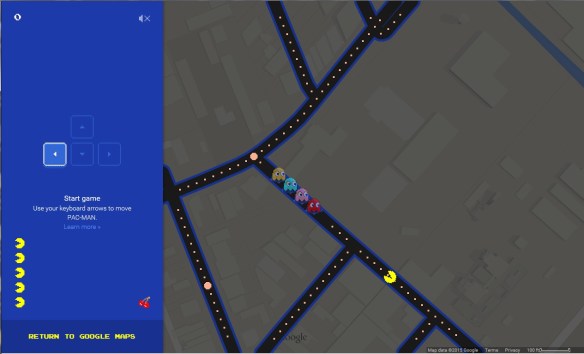
Go to Google Maps, zoom to a location, and you will see the Pac-Man icon displayed in the lower left. Click on it to play Pac-Man using the streets!
If you use Geocortex Viewer for HTML5, update your apps!
From Drew Millen, Geocortex Product Manager at Latitude Geographics Group:
Yesterday we were made aware of a potential security issue affecting all versions of Geocortex Viewer for HTML5, thanks to a vigilant customer contacting our Support team. While we don’t know of any specific attacks that may have exploited this vulnerability amongst our customers, we take potential security issues very seriously. We’re happy to report that we were able to respond quickly, and a patch will be available for download in the Geocortex Support Center in the coming hours. The patch involves replacing a single JavaScript file and does not require a re-install or that you update Geocortex Essentials. We recommend customers with applications that use Geocortex Viewer for HTML5 (all versions) apply the patch. Note that the upcoming release of Geocortex Viewer for HTML5 2.4 will not expose this vulnerability. Here’s what you need to know:
Here’s what we recommend you do:
We apologize for any inconvenience this issue may cause you. Please get in touch with us if you have any questions or if we can help.
GeoTech PCC Guest Lecture Series Spring 2015
Thursday, April 2, 7-9pm
Pasadena City College, Room E220
More details at http://geotechpcc.eventbrite.com
GeoTech PCC is a new program that just started this semester. We’re fortunate to have Jonathan Robinson and Chandler Sterling from the City of Pasadena give our first guest lectures. We want to make sure that those in the surrounding communities know about it!
 SoCalGIS.org