Labeling the Third Word

This is a continuation of my previous post about using the Field Calculator to calc a field to a word position in another field. My whole purpose of the exercise was to use the new field for labeling. But then I thought why create yet another field when you can use what you already have and do the same thing in a labeling expression? So …
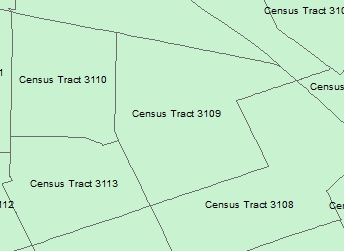
labeling1

I really don’t want the text “Census Tract” in my labels, just the tract numbers. Using Python in a labeling expression should do the trick. First I open the properties of my census tract layer in ArcMap 10.1, click on the Labels tab, and next to my Label Field, click on the Expression button.
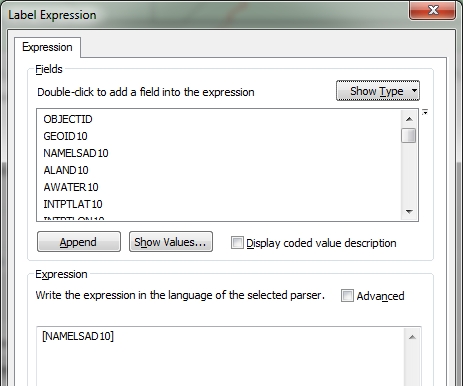
labeling2

Note in the Label Expression window that my current expression is just the field name NAMELSAD10. What I want to do is strip out the “Census Tract” text that all the records have and just label with the tract name, which is the thrid word in the field’s value. So using the .split() function, similar to my previous post, I build the following expression using the Python parser (make sure to check the Advanced box to use multiple lines of code in your expression):

labeling3

So what is going on here? When you use multiple lines of Python code, you are required to use a function called FindLabel. This function is used by ArcMap to label your features after the code is run. When you click on the Advanced box in the menu, the fucntion is setup for you in it’s basic form, which is just labeling the feature with the value in the selected field. I added code between the first line and the last line that sets a variable named L to the Python code that takes the value in the NAMELSAD10 field, splits out the words, and extracts the third word. Remember in Python position 0 would be the first word and position 2 would be the third word. Also note that I modified the last line with return, using L instead of the field name. The function will return the value of L, which will be set to the thrid word that I want, which would be the tract number. Press the OK button and you will see the result.

labeling4

Just like before, but without having to create a new field!

Most coders like to code with as few lines as possible. You could do the same thing by removing the second line setting the L variable, and just manipulate the field value on the return line like so:

labeling5

Here you cut out the middle man, or cut out setting the L variable, and just executed the .split() function on the return line. Easy and efficient!

Let’s back up a bit. What if I did want the “Census Tract” text in my label, but I wanted each word stacked? That can be done by doing this:

labeling6

I set three variables, one for each word, then set the final L variable for the labeling. The ‘\n’ represents a new line character, or for us humans a carriage return to start a new line.  Using this Python expression results in the following labels:
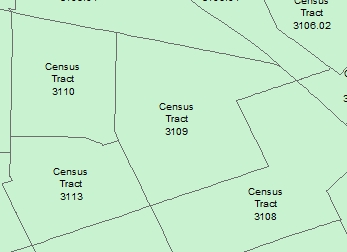
labeling7

Now that you know a few of these tricks, you can start doing some fancy labeling of your own data! -mike

Field Calculator: I just want the third word

Usually once a year I have a need to calc a field to a word position in another field in ArcMap. For example, here is a field from some census data I downloaded:

fieldcalc1

Why did they add the text “Census Tract” to all of these? Seems to be a space waster right? All I really want is just the tract number. So what I will do is create a new field, then calc the value to the 3rd word, or tract number, from the other field.

First I create a new field named appropriately TRACTNUM. You simply do this using the attribute table window pulldown > Add field…

fieldcalc2

Next, I enter the field name, set the type to Text, and set the length to 10.

fieldcalc3

My tract numbers will not be longer than 10 characters. Press the OK button and the field will be added to the end of the attribute table.

Next, I scroll over to the new field name in the attribute table and right click on it to select the field calculator.

fieldcalc4

The field calculator appears. I am using ArcMap 10.1, so I select the Python parser, then double click on the NAMELSAD10 field that contains the tract numbers I want to extract, then set the type to String and click on the .split() function. Next in the expression area between () I enter a double quote, a space, and another double quote, then add [2] at the very end. The expression should look like the following:

fieldcalc5

What this will do is take the text from the NAMELSAD10 field, pass it to the split function which uses the space ” ” as the delimiter to separate the words and then extracts the third word for the TRACTNUM field calculation. In Python, position 0 would be the first word, position 1 the second word, and position 2 the third word, which we want. That is why I used [2].

With everything set in the field calculator, click the OK button. Once the calculation is complete, you will see just the tract numbers in the TRACTNUM field.

fieldcalc6

Now that I documented this, I will not forget how to do this next year! -mike

Reserved PostgreSQL System Column Names

So I’m looking at possibly using PostgreSQL for our enterprise geodatabase.  I was working on installing ESRI’s Public Safety COP web mapping application and I was copying feature classes from a file based geodatabase that comes with the app into PostgrSQL and received this error:

“ERROR 000210: Cannot create output Database Connections … Column already exists [ERROR: column name “xmin” conflicts with a system column name …”

What?  You got to be kidding me!  I was following the directions!  I tried ESRI tech support but for some reason they were swamped and could not help me … I’m still waiting for their call back.  Probably everyone is installing their apps!  So I decided to figure this thing out myself.

So I cannot have a field named XMIN as an attribute to my data?  After consulting the PostgreSQL documentation, sure enough, I cannot have XMIN or XMAX as field names because they are reserved system columns.

Great!  So I guess I cannot use the Public Safety COP or any data that has XMIN or XMAX field names with PostgreSQL.  Hmm.  So I thought I would try our Oracle enterprise geodatabase to see if that works. NOOOOOOOOOOOOOOOOOOOO!  I got this error:

“Underlying DBMS error [ORA-00972: identifier is too long (DEV.DamageResidentialBuilding_ATTACH)] …”

This is very sad!  I think I will go fire up Workstation ArcInfo and be happy!

arc

And it likes XMIN and YMIN too!

-mike