Renaming a Published ArcGIS Server Map Service

In my organization we use ArcGIS Server to serve up map services for our GIS users and other business applications. This year we are looking at re-organizing some of our map services. One of the tasks we have is to rename some of them. Have you ever tried to do that? I thought I would just use ArcCatalog to stop the map service, right click on the name, select rename and change it … but no, you cannot do that. So I tried using ArcGIS Server Manager, but nothing. Do I really have to delete it and recreate it again with the new name?

I did find this suggestion in one of the ESRI forums, but it is not for the faint of heart:

It is possible to change the name of a map service by renaming the config file (cfg) and changing the references inside the cfg file to match the new name. The cache folder will also need to be renamed to match the map service name. You will also need to restart your SOM Service and it’s probably a good idea to remove the existing map service from any existing web applications. A better way to handle this would be to rename the cache folder and publish a new map service to match the renamed cache folder. This will ensure that the map service is created correctly by ArcGIS Server.

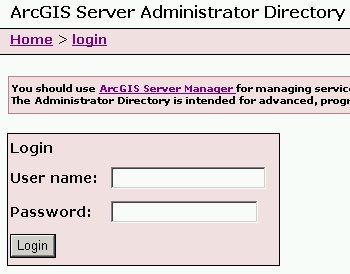
What?  I just want to rename the map service! Well, have no fear, the ArcGIS Server Administrator Directory is here! I’m using ArcGIS Server 10.1, so to get to it I entered the following in a web browser:

http://your-server-name:6080/arcgis/admin
agsadmin1

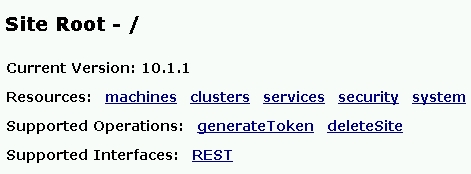
You are presented with a message about using ArcGIS Server Manager instead for managing services and how the Administrator Directory is intended for advanced programmatic access to the server. Ignore all of that and login using your ArcGIS Server admin user name and password. Once logged in, you are presented with a list of Resources and Operations.
agsadmin2

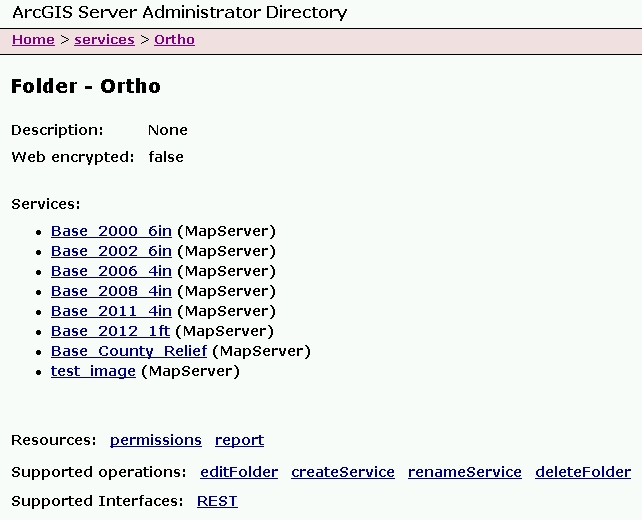
Click on the services Resource. You are then presented with the root folder of your map services directory. Click through until you see the map service you want to change. For this exercise I created a map service named “test_image” that I will rename.
agsadmin3

At the bottom of the listing in Supported Operations, click on renameService.
agsadmin4

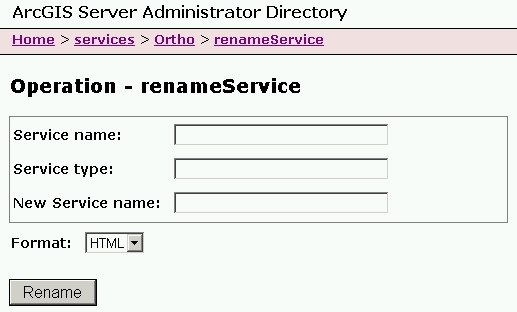
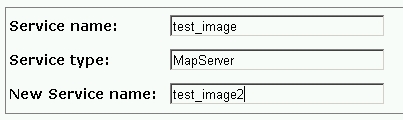
Enter your map service name, service type, and new service name.
agsadmin5

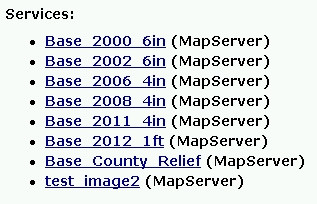
Note since this is a map service, the Service Type is MapServer.  My new map service name will be “test_image2”. Click on the Rename button and wait a little. Once done, you will see the new listing with the name changed.
agsadmin6

That’s all there is to it. Do keep in mind if you change the name and your GIS users connected to the old name, they will need to re-add the service to their map or applications.

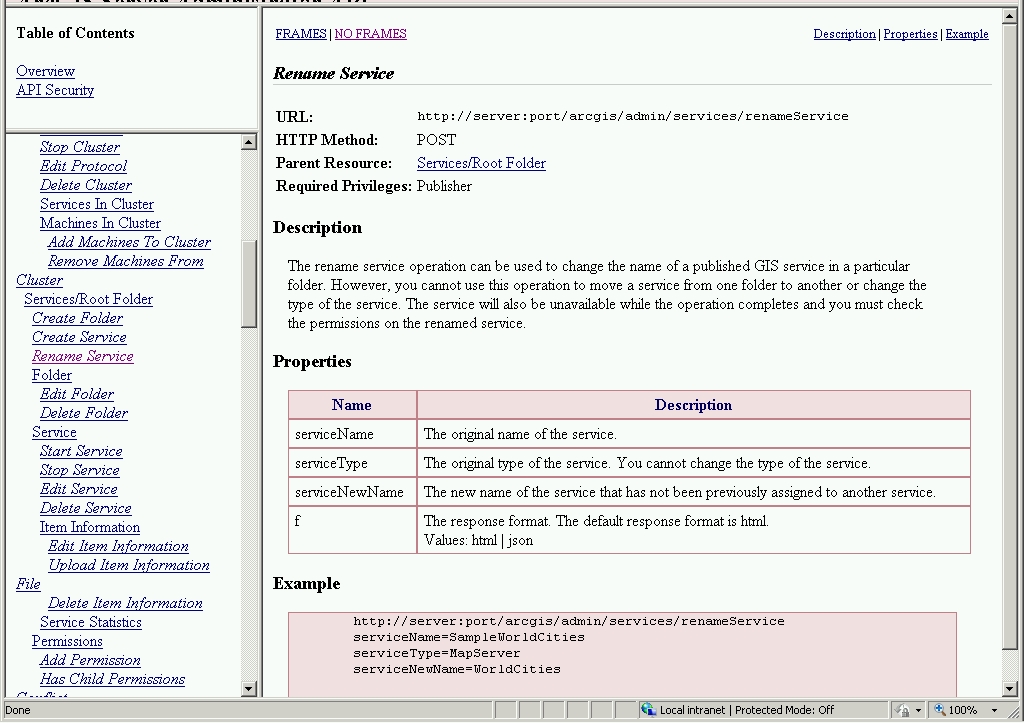
While you’re still in the ArcGIS Server Administrator Directory, click on the API Reference link in the upper right of the page. You can take a look at the renameService reference by scrolling down to Cluster > Rename Service
agsadmin7

That is all for now. I hope this makes renaming map services a little less painful for you.  If you know of a better way, please post a comment to share.

-mike

The Mapmaking Process in 1973

Here’s another one I found for your SoCalGIS info fix … and yes I am catching up from vacation! 🙂  -mike

In 1973, the United States Army produced training film TF5-4523 entitled, “The Mapmaking Process” which it described as explaining the “theory of mapmaking, and illustrates the methods and techniques used to produce maps; planning, surveying, compiling, and reproduction.” Retrieved from the National Archives, the training video is available in three parts for viewing.

Read more and watch the video posted on GIS Lounge:

New USGS Webinar – The National Map Viewer

Hello Pacific Region GIS data users.

In our continuing series of educational GIS webinars for CA, HI, and NV, we would like to follow up the recent EarthExplorer call with one on an equally important USGS data distribution site – The National Map Viewer.

Please join us for a webinar and call on Thursday, January 30 at 11:00 HST, 1:00 PM PST. To sign up for the webinar, just visit the following link to register:

https://usgs.webex.com/usgs/j.php?ED=259146402&RG=1&UID=0&RT=MiM0
Once you have registered for the meeting, you will receive an email message confirming your registration. This message will provide the information (including conference call numbers) that you need to join the meeting. Note that our webinar capacity and phone lines are both limited to 50 people. So depending on the number of people interested, we may not be able to accommodate everyone. But we will monitor the registrations and keep you informed..

This site has lots of GIS-ready data available for free download. We will go over data access, USGS products, viewing data, and web services. Your instructors will be Carol Ostergren and Drew Decker.

From our website (nationalmap.gov/viewer):
Use The National Map Viewer and Download Platform to visualize, inspect, and download our most current topographic base map data and products for free. Managed by the USGS National Geospatial Program (NGP), The National Map Viewer provides access to all eight primary data themes of The National Map to include US Topo and historical topographic map products.
Data include: Elevation, Orthoimagery, Hydrography, Geographic Names, Boundaries, Transportation, Structures, and Land Cover, while products include: US Topo and Historical Topo Maps. The National Map Viewer also allows visualization and identification queries (but not downloads) of Other Featured Data, to include Scanned Topo Maps, Ecosystems, Protected Areas, Gap Analysis Program Land Cover, Wetlands, Public Land Survey System, and National Park Service Boundaries. Also included is a Natural Hazards panel to view hazards-related information, such as for earthquakes, floods, wildfires, and weather, along with the U.S. National Grid for emergency response.

Hope you are able to join us! Contact either of us with any questions.
Thanks,

Carol Ostergren
Drew Decker
——————————————–
Drew Decker
USGS Geospatial Liaison for Pacific Region
NSDI Partnership Office, U.S. Geological Survey
4165 Spruance Road, Suite 200
San Diego, CA 92101
619-225-6430
619-417-2879 cell
619-225-6101 fax
ddecker@usgs.gov
http://liaisons.usgs.gov/geospatial/California/
http://liaisons.usgs.gov/geospatial/Hawaii/
USNG 11S MS 8026 2158